Blog

  • Staying Afloat in Software Development: A Comprehensive Toolkit for Managing Deadlines and Tasks

    ToolkitSoftwareDevelopment-eye-catcher_chatgpt4o_20240921
    ToolkitSoftwareDevelopment-eye-catcher_chatgpt4o_20240921

    In the fast-paced world of Software Development, it’s easy to feel overwhelmed by looming deadlines, complex projects, and the constant need to learn new technologies. The good news is that there are tools and techniques designed to help you navigate these challenges efficiently. By integrating time management strategies like time boxing with Clockodo, leveraging task and issue management in Confluence and Jira, utilizing code management with GitHub, enhancing communication through Microsoft Teams and email, expanding knowledge via online learning platforms, and automating workflows with tool integrations and Jenkins, you can transform chaos into productivity.


    Time Management with Time Boxing and Clockodo

    Effective time management is the cornerstone of productivity. One proven technique is time boxing, where you allocate fixed time periods to tasks, helping you maintain focus and prevent scope creep. Clockodo complements this approach by providing a time-tracking solution that allows you to monitor how you spend each time box. With Clockodo, you can:

    • Set Time Blocks: Define specific periods for tasks and track the actual time spent.
    • Analyze Productivity: Generate reports to identify patterns and optimize your schedule.
    • Do Accounting: Use report to list your billable time boxes.

    By combining time boxing with Clockodo, you create a disciplined environment that enhances focus and productivity.


    Project and Task Management with Confluence and Jira

    Managing complex projects requires robust tools that provide clarity and collaboration. Confluence serves as a centralized platform for documentation and knowledge sharing, while Jira excels in issue and task management.

    In Confluence:

    • Document Everything: Create project pages, meeting notes, and technical documentation.
    • Collaborate Seamlessly: Share insights with team members and gather feedback in real-time.
    • Organize Knowledge: Use hierarchical structures to keep information accessible and organized.

    In Jira:

    • Track Issues: Log bugs, feature requests, and tasks with detailed descriptions.
    • Visualize Progress: Use Kanban boards and dashboards to monitor the status of tasks.
    • Document per Scope: Use links to Confluence pages for extensive temporary as well as sustainable documentation being relevant in the context of the issue.

    Integrating Confluence and Jira ensures that your project management is both comprehensive and cohesive, facilitating better team coordination and project visibility.


    Code Management with GitHub

    In Software Development, code is your craft, and managing it efficiently is vital. GitHub offers a powerful platform for version control and collaboration.

    • Version Control: Keep track of code changes over time, enabling you to revert to previous states if needed.
    • Collaboration: Work with others through branches and pull requests, streamlining code reviews and integrations.
    • Issue-oriented Progress: Link Jira issues to dedicated branches, focusing on code changes relevant for such issues.

    By leveraging GitHub, you maintain code integrity, encourage collaborative development, and align coding efforts with project objectives.

    Confluence does only support history of pages, though, but not branches. If you need to branch your documentation you might look for alternatives like markdown in GitHub or publication of content from a modeling tool like MagicDraw to Confluence.


    Communication with Microsoft Teams and Email

    Clear and timely communication is essential, especially when collaborating remotely or across different teams. Microsoft Teams and traditional email remain indispensable tools.

    With Microsoft Teams:

    • Real-Time Communication: Chat with team members, initiate video calls, and conduct meetings.
    • File Sharing: Share documents and collaborate on files within the platform.
    • Integration: Connect with other tools like Jira and Confluence for streamlined workflows.

    With Email:

    • Formal Communication: Send detailed updates, reports, and official correspondence.
    • Documentation: Maintain records of communications for future reference.

    Utilizing both Teams and email ensures that you can communicate effectively in various contexts, keeping everyone informed and engaged.


    Automation with Tool Integration and Jenkins

    Automation is a game-changer in managing repetitive tasks and ensuring consistency. Jenkins, a leading automation server, enables continuous integration and continuous delivery (CI/CD) pipelines.

    • Automate Builds: Compile and test code automatically upon changes.
    • Integrate Tools: Connect Jenkins with GitHub, Jira, and other tools to create seamless workflows.
    • Monitor Processes: Receive notifications on build statuses and deployments.

    By automating tasks with Jenkins and integrating your toolset, you free up time to focus on more complex problem-solving and innovation.

    The more integration functions you have, the more powerful automation will become. E. g. you could imagine to have an implementation that not only integrates Jira into a modeling tool like MagicDraw, but also publishes model content to Confluence establishing a journey from issue via modeling to documentation. And then imagine what you could do with extending this to generate tests from model content to Jira tests or even execute these tests.


    Continuous Learning with Online Platforms and Sharpening your Knifes

    The field of Software Development is ever-evolving. Staying current requires continuous learning, which is facilitated by online platforms like Coursera, Udemy, and LinkedIn Learning.

    • Flexible Learning: Access courses that fit your schedule and learning pace.
    • Diverse Topics: Explore subjects ranging from programming languages to project management.
    • Community Support: Engage with peers and instructors to enhance understanding.

    By dedicating time to learning, you not only keep your skills sharp but also open doors to innovative solutions and ideas.

    You should also keep your knifes sharp meaning that you should regularly improve your tool set including those typically many little productivity helpers and integration snippets between tools. Over time you will get a powerful integrated toolkit.


    Conclusion

    The synergy of these tools and techniques creates a powerful ecosystem for managing your Software Development projects:

    1. Plan and Track Time: Use time boxing and Clockodo to allocate and monitor your time effectively.
    2. Manage Projects and Tasks: Leverage Confluence and Jira for comprehensive project oversight.
    3. Control and Collaborate on Code: Utilize GitHub for robust version control and collaborative coding.
    4. Communicate Effectively: Keep everyone aligned through Microsoft Teams and email.
    5. Automate Workflows: Implement Jenkins to automate processes and integrate tools.
    6. Continue Learning: Expand your knowledge and skills via online learning platforms.

    By adopting this integrated approach, you transform overwhelming workloads into manageable, efficient processes. Not only do you stay afloat amid deadlines and tasks, but you also set the stage for excellence and innovation in your work not to mention the boost in quality of your deliverables.

    Navigating the complexities of Software Development doesn’t have to be a solitary struggle against time and tasks. By harnessing the power of these specialized tools and strategies, you equip yourself with a robust framework that promotes productivity, collaboration, and continuous improvement. Embrace this comprehensive toolkit, and you’ll find yourself not just staying afloat, but confidently steering towards success.

    Finally, I would like to add that my personal goal for this article was to answer a call for a LinkeIn advice question in no time (https://www.linkedin.com/advice/3/youre-drowning-deadlines-tasks-computer-science-mfa1f). It typically contains half a dozen sections with bullet points. I found that it is much easier for me to write an article like this using ChatGPT-o1 and manually improving the result with selective changes using Cursor AI (https://www.cursor.com/). A beautiful side effect is that the sections are answered in a connected way and not separated from each other. I hope this can be helpful for you as well. Thank you for reading and forgive me not having spent more time on a perfectly generated image.

  • Will MBSE Benefit from Textual Notation?

    Model-Based Systems Engineering (MBSE) is evolving, and a key question arises: Will MBSE benefit from textual notation? The answer is a resounding yes, but it is not the whole story. Graphical representations and much more are still needed. Here’s why.

    Textual Notation as a Complementary Tool

    Textual notation is already a fundamental aspect of many basic modeling tools. Languages like PlantUML and Mermaid derive graphical representations from textual descriptions, making it easier for engineers to visualize their models. Similarly, domain-specific languages (DSLs) like Franca IDL being integrated into modeling tools like MagicDraw have proven effective. These tools allow users to either code or draw, integrating seamlessly with other model content, providing flexibility and ease of use.

    The Emergence of Two-Way Solutions

    Advanced tools are taking this integration further. For instance, sophisticated tools like MagicDraw now offer two-way translations between SysML v2 textual notation and graphical representations. This functionality allows for editing on both sides, akin to how markdown plugins work in VSCode. Such advancements are critical as they cater to both textual and graphical preferences, ensuring broader acceptance and usability.

    Bridging the Gap Between Coders and Modelers

    Textual notations are particularly appealing to those who are closer to coding. For coders, the familiarity of textual input can significantly lower the barrier to entry into the modeling world. Integrating textual notations into Integrated Development Environments (IDEs) where coding happens can streamline workflows and enhance productivity.

    However, for managers, architects, designers, and analysts, graphical representations, output management, and comprehensive lists consistent with models are crucial. Therefore, to effectively engage both technical and non-technical stakeholders, providing a combination of textual notations and corresponding graphical representations is essential.

    Addressing Broader Needs

    Reflecting on over a decade of experience in automotive projects, it is clear that MBSE must address a range of needs to be truly successful and widely accepted. Models must encompass various aspects such as cross-product, cross-solution, product solutions, functional modeling, system architecture, software architecture, and boardnet modeling.

    Additionally, the existing model content in UML and SysML v1 predominantly features graphical representations. Transitioning to textual notations won’t happen overnight. The need for tool integration is paramount. The enterprise environment is a complex network of tools for planning, requirements, system modeling, simulation, test management, and implementation. Tool content is often replicated between neighboring tools or linked, necessitating seamless integration.

    Machine-Readable Models and Analytics

    Models that are not machine-readable are essentially ineffective, serving only as “marketing” diagrams. Ensuring that models are machine-readable and providing model analytics, such as making model content available to tools like Tableau, is highly valued by business users.

    Conclusion

    In conclusion, textual representation like SysML v2 is foundational and will significantly benefit MBSE. However, it must complement diagramming and address other critical needs to be truly effective. The standards are in place, and now it’s time for the tool business to catch up. By embracing both textual and graphical representations, and addressing the diverse needs of stakeholders, MBSE can achieve greater acceptance and success.

  • Exploring AI’s Impact on Jobs: Task-Based Analysis

    DALL·E 2024-05-31 18.19.33 - A futuristic workspace with a systems engineer working on a computer. The engineer is surrounded by holographic interfaces displaying elements aligned
    AI Integration in Systems Engineering, produced using DALL-E, 2024-05-31

    In the landscape of rapid technological advancement, the intersection of Artificial Intelligence (AI) and job roles is a topic of intense discussion. As Salman Khan insightfully points out in his new book “Brave New Words,” people aren’t replaced by AI but by individuals who leverage AI more productively. This perspective, while intriguing, calls for a deeper exploration of how AI impacts various job roles in today’s market.

    Understanding AI’s Impact on Systems Engineering

    One fascinating approach to gauge AI’s influence on jobs is proposed by There’s an AI for That. The website offers an ‘Impact Index’ for various job roles, including Software Engineer, Systems Engineer, Mechanical Engineer, and thousands of others. This index is calculated based on the number of AI applications that support tasks related to these roles. While specific and limited, this approach provides a more concrete perspective than speculative opinions like ‘I believe AI will never …’ or ‘Everybody will loose their jobs’ that are vague beliefs at best and sometimes even cause unnecessary alarm.

    Breaking Down Job Roles into Tasks

    To truly understand AI’s impact on jobs, it’s essential to break them down into their constituent tasks. For each task, we must examine whether AI can already support it effectively, whether AI needs refinement or regulation, or whether AI is currently incapable of supporting the task.

    Sal Khan’s book serves as a real eye-opener in this context illuminating what can be achieved in one year if you go all in. E. g., the one-on-one AI tutor called ‘Khanmigo’ initially gone live along GPT-4 shall not give the final answers right away, but instead guide the student step by step (a so-called Socratic tutor). It can summarize the learning process and give valuable feedback to the teacher incl. recommendations. It can even identify weak spots the teacher might wish to focus on. And it assists the teacher in creating lesson plans saving a lot of time and freeing resources.

    Drawing inspiration from this work, one could investigate systems engineering in a similar vein and develop an ‘MBSEamigo’ analogous to ‘Khanmigo’. The core idea here is to redefine roles based on tasks. In situations where role definitions vary, the strategy would be to identify common denominators and refine roles down to the tasks.

    For instance, consider the role of a systems engineer. This job can be broken down into approximately 1,000 tasks. Each task can then be assessed for AI impact. Here’s a glimpse into some typical tasks and their AI impact:

    • Running Coach: AI Impact: 100% | AIs: 12
    • Codebase Q&A: AI Impact: 95% | AIs: 9
    • Problem Solving: AI Impact: 90% | AIs: 15
    • Diagrams: AI Impact: 50% | AIs: 12
    • Data Protection: AI Impact: 50% | AIs: 4
    • Conversations with Clients: AI Impact: 50% | AIs: 1
    • Audits: AI Impact: 5% | AIs: 1
    • 3D Images: AI Impact: 5% | AIs: 22

    A Closer Look at Key Tasks

    Running Coach (AI Impact: 100%)

    In systems engineering, optimizing processes and workflows is crucial. AI tools can act as running coaches, continuously analyzing and improving these processes with precision and speed. For example, AI can automate routine checks and suggest improvements, ensuring systems run smoothly and efficiently.

    Codebase Q&A (AI Impact: 95%)

    AI-driven tools like code analyzers and automated testing frameworks significantly enhance codebase management. They can identify bugs, suggest fixes, and predict potential issues before they become critical, thereby reducing downtime and increasing productivity.

    Problem Solving (AI Impact: 90%)

    AI excels in problem-solving by offering data-driven insights and predictive analytics. For systems engineers, this means quicker diagnosis of issues and more effective solutions. AI can simulate various scenarios to find the most optimal solutions, saving time and resources.

    Applying Foundational Engineering Principles

    Incorporating AI into systems engineering must align with foundational engineering principles. This means ensuring that AI tools are used to enhance precision, reliability, and efficiency. Systems engineers should focus on maintaining robustness and accuracy in their projects while leveraging AI to handle repetitive and data-intensive tasks.

    To do this:

    • Verification and Validation: Regularly test AI tools to ensure they produce reliable and accurate results.
    • System Integration: Seamlessly integrate AI into existing systems without disrupting core functionalities.
    • Continuous Improvement: Use AI for ongoing analysis and optimization of engineering processes.
    • Documentation and Transparency: Keep thorough documentation of AI’s role and decisions in the engineering process for transparency and traceability.

    The Future of Systems Engineering with AI

    The journey of AI in systems engineering is just beginning. By continually refining AI tools and expanding their capabilities, we can create more efficient, innovative, and secure systems.

    As highlighted in Engineering.com, AI has the potential to revolutionize engineering by automating complex tasks, predicting system behaviors, and providing advanced analytics. Currently, using tools requires understanding how to manipulate and connect various elements, which involves tedious tasks like moving the mouse around. This repetitive work, similar to past challenges in the CAD world, is expected to be minimized in the future.

    SElive also identifies potential AI use cases. This integration not only boosts productivity but also fosters innovation by enabling engineers to focus on more strategic and creative aspects of system development. One notable example is the Technology Summarizer, which employs AI algorithms to analyze and condense vast amounts of technical documentation. This tool helps engineers quickly grasp essential information, stay updated with the latest advancements, and make informed decisions without being bogged down by extensive reading.

    The upcoming book “AI Assisted MBSE with SysML by Doug Rosenberg, Tim Weilkiens (mbse4u.com))” explores the integration of Artificial Intelligence in Model-Based Systems Engineering (MBSE) using the Systems Modeling Language (SysML). It highlights how AI can automate and enhance various MBSE tasks and provides methodologies along a comprehensive, step-by-step design of a Scanning Electron Microscope.

    Final Thoughts

    The integration of AI in the job market isn’t about replacement but about redefining roles and tasks so AI can be leveraged for increased productivity. The key lies in understanding AI’s impact on individual tasks and adapting job roles accordingly. As AI continues to evolve, our approach to integrating it into our workflows must also adapt, ensuring we stay ahead in this dynamic field.

    I am convinced that we will see a net job effect again as we have been seeing with automation. To the younger generations: experts are still needed. Do not let social media make you panic! Anybody can get anything out of ChatGPT, but only the expert speaks the sophisticated language of a discipline achieving much better results that also need to be curated by the very same expert.

  • Some Thoughts on MBE for Digital Threads

    This discussion emphasizes the importance of data-based engineering in the context of model-based (system) engineering, particularly in developing digital threads. Key principles proposed include prioritizing the system over data, integration over data islands, and data over visualization and documents.

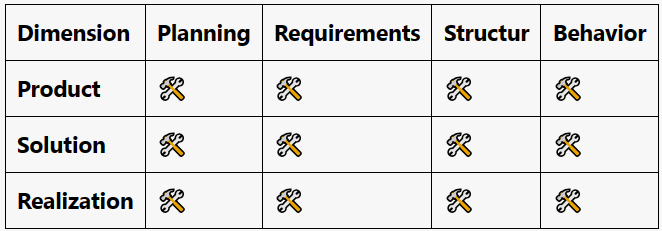
    Schematic Tool Grid

    5-minute read:
    On MBE for Digital Threads

    Summary

    The “data” in context refers to that used in information systems contributing to the digital thread, more specifically, data in tools located within an engineering architecture framework along vertical and horizontal dimensions. Several tools are involved in this framework, each serving different functions and dimensions. For instance, MagicDraw refines budget-level vehicle functions into product use cases, while Codebeamer provides product requirements that help shape these use cases.

    The integration of these tools creates a grid that needs to be extended to account for other aspects such as the publication of model data and the development of test cases. While bundling combination cells into fewer tools like PLM can simplify this process externally, similar integration still occurs internally. Ultimately, this integrated tool grid should ideally reflect the productive systems, reinforcing the necessity of an integrated approach.

  • Domain-Specific Languages explained for Stakeholders

    Imagine you’re in a bustling professional kitchen. The heat, the noise, the coordinated chaos. This is a lot like software development, and you’re about to see why.

    Get your introduction to the concept and benefits of Domain-Specific Languages (DSLs). It’s quite a topic, but this culinary journey will make it, well, digestible.

    professional kitchen in a well-managed restaurant
    https://labs.openai.com/s/3mptF5d1dlDf7HmyqcgvCn1M

    5-minute read:
    Domain-Specific Languages explained for Stakeholders (mem.ai)

    Summary

    Amuse-Bouche (Software Development through Cooking): Welcome to the kitchen, where every role, from the head chef to the dishwasher, has a counterpart in a software development team.

    Appetizer (Recipes do change with Time): Just as orders in a kitchen can change based on customer feedback or ingredient availability, tasks in software development are also adjusted in response to feedback and constraints.

    Main Course (Managing Complexity for a growing Kitchen): As our kitchen grows, we need tools and techniques to manage the complexity. Imagine a Kitchen Modeling Language (KitchenML) that helps us coordinate all the moving parts.

    Dessert: Finally, let’s reflect on our journey. We’ve seen how a kitchen and a software development team can be similar, but also how they differ. One is physical and sequential, the other virtual and iterative.